Blog
What Is a Wireless Lock and How Does It Work?
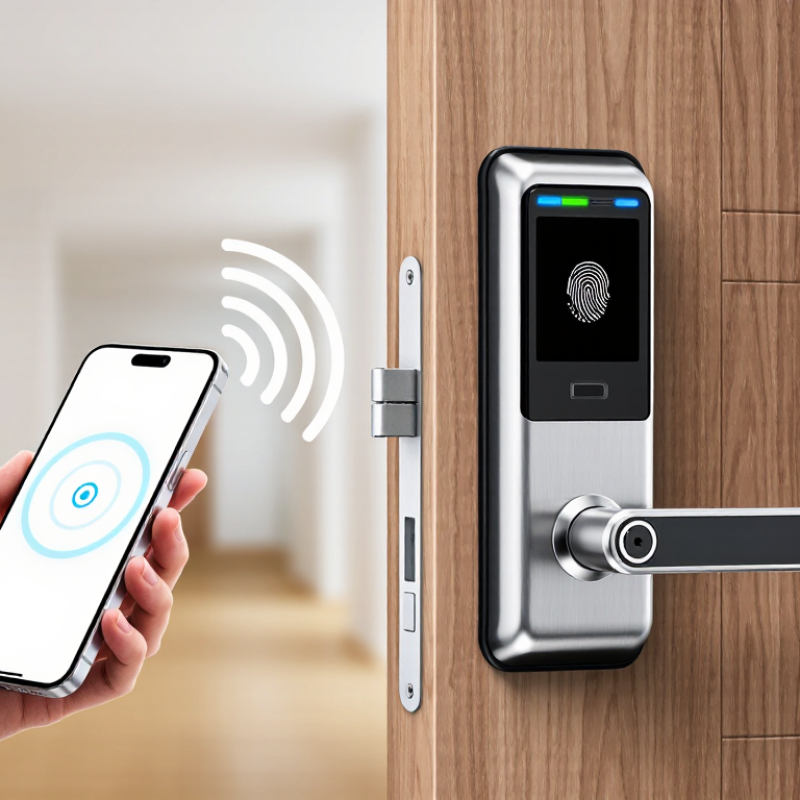
A Wireless Lock is an electronic access device that controls entry without requiring a traditional metal key. It may use Bluetooth, Wi-Fi, radio frequency identification, or another approved wireless protocol. When an authorized user presents a phone, card, keypad code, or biometric credential, the lock checks that identity. It then releases the latch or keeps it secured.
The process looks simple. It is not always simple.
Inside the unit, a controller evaluates the credential, communicates with the access system, and records activity when supported. Some models connect directly to a network, while others work through a nearby hub. Batteries often power the lock, so low-power alerts and emergency access options matter. A practical inspection should check the door alignment, signal strength, battery condition, and credential permissions. A perfectly installed lock can still perform poorly on a heavy door or in a crowded wireless environment.
Security depends on more than wireless communication. Strong encryption, updated firmware, limited user privileges, and reputable manufacturers all influence reliability. Professional installation also helps prevent loose fittings, exposed wiring, and incorrect settings. Wireless does not mean risk-free. It means access management becomes more flexible, measurable, and dependent on technology.
The term may sound modern, but the basic purpose remains familiar: allow the right person through and keep others out. Real-world performance can vary. Weather, interference, software errors, and forgotten credentials may create inconvenient failures. Understanding how a Wireless Lock works helps property owners choose suitable equipment, maintain it properly, and plan safer access procedures.
What Is a Wireless Lock?
A wireless lock is an electronic locking device that communicates without a traditional control cable. It may secure a door, cabinet, gate, or storage area. Instead of carrying a metal key, users present a credential. This could be a mobile signal, access code, card, or fingerprint. The lock checks that credential before releasing its internal mechanism.
The basic process is simple. A reader receives the credential and sends the data to a control unit. The unit compares it with approved access records. If the information matches, a motor moves the latch. Power usually comes from batteries, although some systems use local electrical wiring. Wireless communication may connect the lock to a nearby hub or management system. It does not mean the lock needs no power.
Security depends on more than the wireless connection. Reliable systems use encrypted communication, protected credentials, event records, and permission controls. Administrators should update software and replace batteries before they become weak. A low-battery warning is useful, but it can be missed. That assumption is convenient, but incomplete. Physical strength still matters. A well-designed lock needs a suitable door, protected mounting points, and a dependable emergency entry method. In real installations, signal blockage can also occur near thick concrete, metal frames, or crowded electronic equipment. Testing the lock in its actual location is wiser than trusting specifications alone.
What Components Make Up a Wireless Lock?
A wireless lock combines mechanical security with electronic control. Its lock body contains the latch or deadbolt that physically holds a door closed. An electric motor or solenoid moves this mechanism after receiving an approved command. The outside reader may use a keypad, mobile credential, fingerprint sensor, or contactless tag. The reader must identify the user before the lock releases.
The control board acts as the lock’s decision center. It checks credentials, records access events, and sends instructions to the actuator. A wireless communication module connects the lock with a phone, gateway, or management system. Depending on the design, it may use Bluetooth, Wi-Fi, or another low-power connection. A small battery pack supplies energy, while a backup power contact can help during emergencies. Battery condition matters more than many buyers expect.
Door-position and tamper sensors add useful awareness. They can report whether the door is open, closed, or disturbed. In real installations, alignment is often the quiet problem. A slightly sagging door can make a strong lock seem unreliable. Good systems also protect communication with encryption and require secure administrator settings. Yet no electronic part is perfect. Batteries weaken in cold spaces, wireless signals can meet obstacles, and software settings need review. Regular testing remains necessary, even when the lock appears to work normally.
How Does a Wireless Lock Operate?
A wireless lock controls entry without requiring a traditional metal key. It usually combines a credential reader, a small control unit, and a motorized latch. The credential may be a keypad code, mobile signal, card, or remote button. When someone presents valid permission, the reader sends encrypted data to the controller. The controller checks the credential against stored access rules. If approved, it powers a motor or solenoid, releasing the latch for a few seconds. Then the mechanism locks again automatically.
Power normally comes from batteries, although some installations use low-voltage wiring. The lock may connect to a local hub or communicate directly with an authorized device. In connected systems, access events can be recorded with time and user details. Offline models may store permissions internally and synchronize later. From practical installation experience, alignment matters greatly. A weak battery is not the only problem; pressure from a misaligned door can also prevent reliable unlocking. Wireless performance may decline near dense concrete, metal frames, or electrical equipment. No setup is perfect.
Tips: Test the lock with the door fully closed. Check battery warnings regularly. Keep an approved backup access method available. Update permissions when staff or residents change. Review access records for unusual patterns, but protect personal information. A professional installer should also test emergency release behavior and confirm that the lock suits the door’s construction.
How Do Wireless Locks Communicate and Verify Access?
A wireless lock connects a door to an electronic access system without requiring a traditional wired connection. It usually communicates through Bluetooth, Wi-Fi, Zigbee, or near-field communication. The chosen method affects range, battery life, speed, and reliability. Bluetooth may work well beside a door, while Wi-Fi can support remote management across a larger property.
Communication begins when a phone, keypad, card, or approved device sends an access request. The lock checks the credential against stored permissions or a secured management server. Modern systems typically use encryption, rotating codes, and device authentication to reduce interception risks. If the credential is valid, the lock releases its motor for a brief period. It may also record the user, time, and entry status in an activity log.
The process is not flawless. A drained battery, blocked radio signal, or delayed network can interrupt verification. Local authorization can help when the internet fails, but it may show outdated permissions. Regular battery checks matter. So does testing access near concrete walls, metal doors, and crowded wireless areas. A careful installer should review failed-entry records and confirm that permissions match real responsibilities. Convenience is useful, but reliable access depends on maintenance, accurate configuration, and clear recovery procedures.
What Types of Wireless Locks Are Available?
Wireless locks replace a metal key with radio communication, a digital credential, and an electronic actuator. Types differ mainly by connection method.
Bluetooth Locks work nearby. A phone can open a door within several metres, even without internet. They suit apartments, offices, and private rooms. Wi-Fi locks connect directly to a local network, enabling remote status checks and temporary codes. However, they demand stronger network hygiene and may consume batteries faster. Zigbee and Z-Wave locks use low-power mesh networks. They are practical in larger buildings with a compatible hub. NFC locks respond to a close tap, while cellular models communicate independently through mobile networks. That independence can be useful, but subscription and signal costs deserve attention.
Market figures show why this category keeps expanding. Grand View Research projects the global smart-lock market to grow at a 19.6% CAGR from 2023 to 2030. Fortune Business Insights estimates the market at USD 2.49 billion in 2023, reaching USD 8.21 billion by 2032. These reports use different definitions, so the numbers should not be compared casually. During field testing, installers should check door alignment, battery access, emergency power, and offline behavior. A lock that opens quickly in a showroom may struggle beside a thick concrete wall. That is the uncomfortable detail. Wireless convenience still depends on hardware, placement, and maintenance.
What Is a Wireless Lock and How Does It Work? - What Types of Wireless Locks Are Available?
| Wireless Lock Type | How It Works | Common Wireless Technology | Typical Access Methods | Power Source | Typical Range | Key Advantages | Common Limitations | Suitable Applications |
|---|---|---|---|---|---|---|---|---|
| Bluetooth Smart Lock | The lock communicates with an authorized smartphone or access device when it is within communication range. The credential is verified locally or through a connected access system. | Bluetooth Low Energy (BLE) | Mobile app, digital key, keypad, or mechanical key override | Replaceable or rechargeable batteries; some models support external emergency power | Usually about 5–15 m in typical indoor conditions | Low power consumption, convenient smartphone access, and generally good privacy because communication is short range | Limited remote access unless paired with an internet-connected hub or gateway; performance can be affected by walls and radio interference | Residential doors, offices, rental properties, cabinets, and shared spaces |
| Wi-Fi Smart Lock | The lock connects directly or indirectly to a local Wi-Fi network, allowing commands and status information to travel through an internet-connected system. | Wi-Fi, commonly on the 2.4 GHz band | Mobile app, web dashboard, voice control, keypad, digital code, or physical key | Batteries or wired low-voltage power; continuous Wi-Fi communication may use more energy | Network-dependent; local coverage is typically around 20–50 m indoors, depending on building conditions | Remote locking, activity notifications, user management, and integration with wider smart-home systems | Higher battery consumption, dependence on network availability, and greater cybersecurity responsibilities | Homes, small businesses, vacation properties, and doors requiring remote monitoring |
| Zigbee Smart Lock | The lock communicates with a compatible hub. The hub connects the lock to an automation platform or remote-management service. | Zigbee mesh networking | Mobile app, keypad, automation routine, digital code, or physical key | Usually battery powered | Approximately 10–30 m per wireless hop; mesh networks can extend coverage through additional powered devices | Low energy use, reliable local automation, and support for mesh-network communication | Requires a compatible hub or coordinator; interoperability depends on profiles and system configuration | Smart homes, apartments, offices, and multi-device building automation systems |
| Z-Wave Smart Lock | The lock sends encrypted commands to a central hub over a low-power mesh network. The hub manages automation and may provide remote access. | Z-Wave mesh networking | Mobile app, keypad, automation rule, digital code, or physical key | Typically battery powered | Often about 30–100 m per hop in open conditions; building materials can reduce practical range | Low power consumption, mesh-network resilience, and controlled device interoperability | Needs a compatible hub; regional radio frequencies and system compatibility must be checked before installation | Residential and light-commercial access systems using centralized home automation |
| RFID or NFC Lock | A reader detects an authorized card, key fob, wristband, or near-field mobile credential and releases the locking mechanism after validation. | Radio-frequency identification (RFID) or Near Field Communication (NFC) | Contactless card, key fob, wristband, or compatible smartphone credential | Battery powered or wired, depending on the lock and reader design | Usually a few centimeters for NFC; RFID range varies by frequency and reader design | Fast contactless entry, easy credential assignment, and convenient access management | Credentials can be lost or copied if poorly protected; compatibility depends on frequency, card type, and security protocol | Hotels, offices, lockers, gyms, educational facilities, and controlled interior areas |
| Wireless Keypad Lock | An onboard controller compares an entered PIN with stored credentials and activates the lock when the code is valid. | May use Bluetooth, Wi-Fi, Zigbee, Z-Wave, or a proprietary low-power radio link | PIN code, temporary code, mobile app, or physical key override | Usually replaceable batteries; some commercial systems use wired power | Depends on the integrated wireless technology; keypad operation itself does not require a phone | Keyless entry, easy code sharing, and useful temporary or scheduled access permissions | PINs can be observed or shared; the keypad and battery compartment require physical protection | Residential entrances, offices, storage rooms, rentals, and shared facilities |
| Wireless Biometric Lock | An integrated sensor captures a fingerprint or other supported biometric pattern and compares it with an enrolled template before unlocking. | Bluetooth, Wi-Fi, or another short-range wireless protocol for administration and monitoring | Fingerprint, mobile app, PIN, card, or mechanical key backup | Battery powered or wired, depending on the model | Wireless range depends on the communication protocol; biometric verification occurs at the lock | Convenient identity-based access without carrying a card or remembering a code | Sensor accuracy may be affected by dirt, moisture, or finger condition; biometric data requires careful protection and privacy controls | Homes, offices, laboratories, private rooms, and restricted storage areas |
| Wireless Cabinet and Locker Lock | A compact electronic locking unit receives an authorized credential and releases a latch, cam, or bolt inside the cabinet or locker. | Bluetooth, RFID, NFC, keypad radio, or low-power proprietary wireless communication | Card, key fob, smartphone, PIN, or assigned code | Small replaceable batteries or shared wired power | Usually short range, from a few centimeters for NFC to approximately 10–15 m for some Bluetooth systems | Compact design, keyless operation, and simplified management of shared storage | Small batteries may need frequent replacement; limited space can restrict emergency override and maintenance access | Employee lockers, schools, gyms, parcel compartments, offices, and personal storage |
| Wireless Gate and Door Access Controller | A wireless reader or controller verifies a credential and sends an electronic release signal to a compatible electric strike, magnetic lock, or motorized mechanism. | Wi-Fi, cellular, Bluetooth, RFID, or a combination of technologies | Mobile credential, access card, keypad, remote command, or vehicle-related credential | Usually wired power with battery backup; some remote gates use solar-assisted systems | Varies widely; cellular systems provide broad-area connectivity, while local readers are typically short range | Supports centralized access management, event logging, and remote control for multiple entry points | Installation is more complex; power failure, network outage, and emergency egress requirements must be addressed | Apartment entrances, commercial buildings, parking gates, campuses, and perimeter access points |
| Cellular-Connected Smart Lock | The lock or its gateway communicates over a cellular network, enabling remote status checks and commands without relying on the property’s local Wi-Fi. | Cellular networks such as LTE or other supported mobile-data standards | Mobile app, management platform, scheduled credential, keypad, or physical key | Battery powered or wired; cellular communication can increase energy use | Network coverage dependent; remote operation can work across a wide geographic area | Remote management in locations without fixed internet service and independent connectivity from local Wi-Fi | Requires cellular coverage and often a service plan; operating costs and power requirements may be higher | Remote properties, infrastructure sites, property portfolios, gates, and temporary access locations |